I DO SOMETHING TO eDUCATION



The Application of Integrated Control Unit in Smart Classrooms
Integrated Control Unit, Smart Classrooms,
6/1/20254 分钟阅读
Keywords: Integrated Control Unit, Smart Classrooms, Centralized Device Management, Audio - Visual Equipment, Classroom Environment Regulation, Connectivity, Network Management, Identity Verification, Communication, Remote Management, Monitoring ##
1. Centralized Device Management
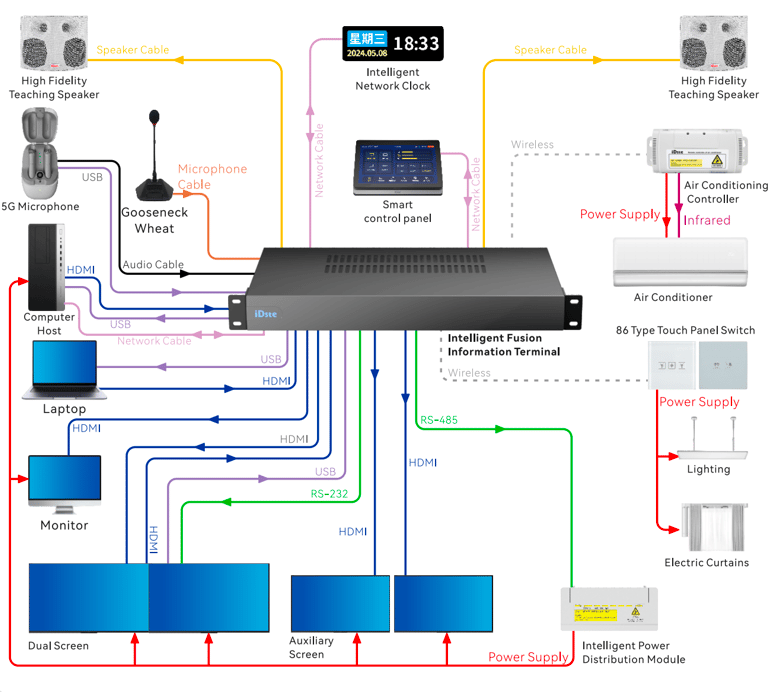
The Integrated Control Unit (ICU) serves as the nerve center of a smart classroom, enabling centralized management of a plethora of devices.
1.1 Audio - Visual Equipment Control
Power Amplifier Function: It integrates a power amplifier, which is crucial for ensuring high - quality sound distribution. In a smart classroom, clear audio is essential for effective teaching. Whether it's the teacher's lecture, educational videos, or audio - based learning materials, the power amplifier within the ICU boosts the audio signals. This ensures that every student, regardless of their seat location, can hear the sound clearly without any distortion or volume imbalance. For example, during a language learning class where listening comprehension is emphasized, the accurate amplification of audio materials helps students improve their language skills.
Seamless Matrix and KVM Switcher for Visuals: The seamless matrix function allows for smooth switching between multiple visual signal sources such as computers, tablets, and document cameras. Teachers can effortlessly shift from presenting a PowerPoint on their computer to displaying a live demonstration on a document camera. The KVM switcher further simplifies the control process. With a single set of keyboard and mouse connected to the ICU, teachers can operate different devices without the hassle of reconnecting input devices each time. This seamless operation enhances the teaching efficiency and flow, preventing disruptions during the presentation of educational content.
1.2 Classroom Environment Regulation
Lighting, Climate, and Shading Control: The ICU plays a pivotal role in managing the classroom environment. It can be connected to lighting systems, allowing teachers to adjust the brightness according to the teaching needs. For instance, in a multimedia - intensive class, dimming the lights can enhance the visibility of the projection screen. The unit can also control the air - conditioning system, maintaining a comfortable temperature for students and teachers. Additionally, it can operate window blinds or shades, either manually or based on environmental sensors. If the sunlight is too bright, the blinds can be adjusted automatically to reduce glare on the teaching screen.
2. Connectivity and Network Management
2.1 Switch Function
The integrated switch in the ICU enables the interconnection of all network - enabled devices in the smart classroom. Computers, smart boards, student tablets, and other devices can be linked together to form a local area network (LAN). This connectivity is vital for sharing educational resources. Teachers can easily distribute files, assignments, and teaching materials to students' devices. Moreover, it supports real - time interaction, such as in online collaborative projects where students can work together on a shared document simultaneously. It also provides a stable network foundation for accessing online educational platforms, enriching the teaching and learning experience with a vast array of digital resources.
3. Identity Verification and Communication
3.1 Control Panel Features
IP - based Intercom: The control panel of the ICU is equipped with an IP - based intercom system. This feature allows for seamless communication within the classroom and with external parties. Teachers can communicate with the school's administrative office, technical support team, or even other classrooms without having to use a separate communication device. In case of emergencies, such as a sudden equipment malfunction or a safety issue, the intercom provides a quick and efficient way to seek help.
Card Reader and Facial Recognition: The inclusion of a card reader and facial recognition technology on the control panel enhances security and access control in the smart classroom. Students and teachers can use their ID cards or facial features to gain access to the classroom or certain restricted functions within the smart classroom system. For example, only authorized teachers can access the advanced settings of the teaching equipment. This not only ensures the security of the equipment but also helps in managing student attendance. When a student uses facial recognition to enter the classroom, the system can automatically record their arrival time, streamlining the attendance - taking process.
4. Remote Management and Monitoring
The ICU also supports remote management and monitoring capabilities. School administrators or technical support staff can access the ICU's interface remotely. They can monitor the status of all connected devices in the smart classroom, such as checking if the projectors are functioning properly or if the network is stable. In case of any issues, they can perform remote troubleshooting, like restarting a device or adjusting its settings. Additionally, they can pre - configure the classroom environment, such as setting the temperature and lighting levels in advance for a scheduled class. This remote functionality significantly reduces the time and effort required for on - site management and maintenance, ensuring that the smart classroom is always in an optimal state for teaching and learning.